


Bản mẫu:Nhiều hình/doc
 | Đây là một trang con tài liệu dành cho Bản mẫu:Nhiều hình. Nó gồm có các thông tin hướng dẫn sử dụng, thể loại và các nội dung khác không thuộc về phần trang bản mẫu gốc. |
 | Trước khi thực hiện một bộ sưu tập, xin vui lòng đọc qua chính sách sử dụng hình ảnh cho phòng trưng bày. Nói chung, một bộ sưu tập không nên được thêm vào miễn là có không gian cho hình ảnh được trình bày một cách hiệu quả bên cạnh văn bản. |
 | Bản mẫu này sử dụng Lua: |
 | Bản mẫu này sử dụng TemplateStyles: |
This template creates a box with two to ten images arranged vertically or horizontally with captions for the entire box or for each image.
With the appropriate choice of parameters, the template can automatically resize images to a given total width with each image having the same height.
Be aware that this template does not respect users' default image size preferences. (Wikipedia:Image use policy states: "Except with very good reason, do not use
)px"... "which forces a fixed image width. In most cases upright=scaling factor should be used, thereby respecting the user's base preference (which may have been selected for that user's particular devices)."
If image size parameters are omitted, this template sets all images at 200px wide, regardless of whether the reader has set a preference for some other default image width. This causes multiple images to look out of scale to the other images in an article.
Cú pháp và các thông số
- Không có tự động thay đổi kích thước của tất cả các hình ảnh để cùng một chiều cao
{{nhiều hình<!-- Layout parameters --> | align = <!-- right (default), left, center, none --> | direction = <!-- horizontal (default), vertical --> | background color = <!-- box background --> | width = <!-- displayed width of each image in pixels (an integer, omit "px" suffix); overrides "width[n]"s below --> | caption_align = <!-- left (default), center, right --> <!-- Header --> | header_background = | header_align = <!-- center (default), left, right --> | header = <!--image 1--> | image1 = <!-- filename only, i.e. without "Tập tin:" or "Hình:" prefix --> | width1 = <!-- displayed width of image; overridden by "width" above --> | alt1 = | link1 = | caption1 = <!--image 2--> | image2 = <!-- filename only, i.e. without "Tập tin:" or "Hình:" prefix --> | width2 = <!-- displayed width of image; overridden by "width" above --> | alt2 = | link2 = | caption2 = <!-- and so on, to a maximum of 10 images (image10) --><!-- Footer --> | footer_background = | footer_align = <!-- left (default), center, right --> | footer = }}
- Tự động thay đổi kích thước của tất cả các hình ảnh để cùng một chiều cao và tổng chiều rộng cho
{{nhiều hình<!-- Layout --> | align = <!-- right (default), left, center, none --> | direction = <!-- horizontal (default), vertical --> | background color = <!-- box background --> | total_width = <!-- total width of all the displayed images in pixels (an integer, omit "px" suffix) --> | caption_align = <!-- left (default), center, right --> <!-- Header --> | header_background = | header_align = <!-- center (default), left, right --> | header = <!--image 1--> | image1 = <!-- filename only, i.e. without "Tập tin:" or "Hình:" prefix --> | width1 = <!-- full width of the ORIGINAL UNSCALED image --> | height1 = <!-- full height of the ORIGINAL UNSCALED image --> | alt1 = | link1 = | caption1 = <!--image 2--> | image2 = <!-- filename only, i.e. without "Tập tin:" or "Hình:" prefix --> | width2 = <!-- full width of the ORIGINAL UNSCALED image --> | height2 = <!-- full height of the ORIGINAL UNSCALED image --> | alt2 = | link2 = | caption2 = <!-- and so on, to a maximum of 10 images (image10) --><!-- Footer --> | footer_background = | footer_align = <!-- left (default), center, right --> | footer = }}
| Tham số | Miêu tả |
|---|---|
| align | right (default), left, center |
| direction | horizontal (default), vertical |
| background color | To set the background color of the box in which the images appear. |
| header_background | |
| header_align | center (default), left, right |
| header | |
| width | Use to set the same width for each image (i.e. overrides any width[n] below). Do not include if different image widths intended, including if images are to be resized to a fixed total width. |
| total_width | Use to scale the images to the same height and this total width. Do not use both total_width and width. |
| image[n] | (where [n] = 1 to 10) Filename of [n]th image. |
| width[n] | (as above) Two meanings: (1) The width (in pixels, integer, omit "px") of [n]th image. Overridden by width (if set). (2) The full width of the original [n]th image if total_width is given in order to resize all images to the same height and a given total width. |
| height[n] | (as above) The full height of the original [n]th image if total_width is given in order to resize all images to the same height and a given total width. Ignored otherwise. |
| alt[n] | (as above) Alt description for [n]th image. |
| link[n] | (as above) To specify the page to which the [n]th image is linked (i.e. the page that is loaded when the image is clicked). If set as empty (e.g. ...|alt1=... |link1= |caption1=...), linking is disabled (even to the standard Wikipedia image description page); consider WP:ALT. Note: This parameter must not be used with images that have been given free licenses (such as the GDFL or a free CC license) as these licenses require images to be linked to a declaration of the license under which they are being used. |
| caption[n] | (as above) Caption for the [n]th image. |
| caption_align | left (default), center, right |
| footer_background | |
| footer_align | left (default), center, right |
| footer | Caption that spans the entire box, as opposed to individual images. |
Các ví dụ


{{nhiều hình | width = 60 | image1 = Yellow card.svg | alt1 = Hình ô van màu vàng | image2 = Red card.svg | alt2 = Hình ô van màu đỏ | footer = Các cầu thủ đang chơi bị cảnh cáo với một thẻ vàng và bị đuổi khỏi sân với một thẻ đỏ.}}

{{nhiều hình | align = left | direction = vertical | width = 200 | header = Trưng bày trong suốt [[Mạng di động đồ họa|PNG]] | image1 = PNG transparency demonstration 1.png | alt1 = Xúc xắc màu với nền màu trắng | caption1 = Một hình ảnh PNG với một lớp 8-bit trong suốt... | image2 = PNG transparency demonstration 2.png | alt2 = Xúc xắc màu với nền màu trong suốt | caption2 = ...Ở đây bao phủ một nền màu trong suốt.}}


{{nhiều hình | width = 60 | image1=Ribbon numeral 2.png | alt1=2 | image2=Ribbon numeral 3.png | alt2=3 | image3=Ribbon numeral 4.png | alt3=4 | footer = Khi một thành viên có rất nhiều loại của [[WP:BARN|barnstar]], họ có thể đại diện cho họ với [[WP:RIBBON|ruy băng]] và các chữ số để cho biết số đếm.}}Với màu nền (background color)


{{nhiều hình | background color = #BBDD99 | width = 160 | image1 = Adoxa_moschatellina_210406.jpg | alt1 = Thảo mộc màu xanh lá cây với một vài bông hoa nhỏ xíu, màu vàng-trắng | image2 = Adoxa_moschatellina_210406a.jpg | alt2 = Ba hoa nhỏ màu trắng và màu vàng trước khi nền màu xanh lá cây | image3 = adoxa_moschatellina_blatt.jpeg | alt3 = Lá của một trồng cây, trong mỗi nhóm ba với ba thùy | footer_background = #BBDD99 | footer_align = center | footer = [[Adoxa]] (''Adoxa moschatellina'')}}Với các liên kết (link[n])
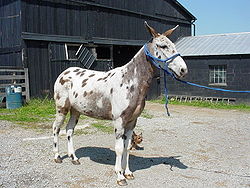
(骡子 luózi)

(驴子 lǘzi)

(鱼 yú)
{{nhiều hình | align = left | image1 = Frecklesmule.jpg | width1 = 143 | alt1 = Một con la | link1 = Con la | caption1 = Một con la<br />(骡子 ''luózi'') | image2 = Donkey 1 arp 750px.jpg | width2 = 150 | alt2 = Một con lừa | link2 = | caption2 = Một con lừa<br />(驴子 ''lǘzi'')</center> | image3 = Rainbow_trout.png | width3 = 91 | alt3 = Một con cá hồi | caption3 = Một con cá<br />({{lang|zh|2=鱼}} ''yú'')</center> | footer = Hình ảnh con la liên kết đến [[Con la]]; hình ảnh con lừa không liên kết bất cứ nơi nào; hình ảnh cá hồi liên kết đến một [[Trang miêu tả hình ảnh|trang miêu tả hình ảnh chuẩn]].}}Sử dụng direction
Theo mặc định, các hình ảnh được bản mẫu sắp xếp theo chiều ngang, thành hàng (xem bên trái; tương đương với thiết lập |direction=horizontal). Để trình bày chúng theo chiều dọc, nghĩa là thành cột, thiết lập |direction=vertical (xem bên phải).
Để phù hợp với chiều cao hình ảnh
- Decide on a total width for all the images, say 320px
- Examine the individual image pages to obtain the full resolution. For example:
- Tập tin:Donkey 1 arp 750px.jpg shows "Donkey_1_arp_750px.jpg (750 × 536 pixels, file size: 125 KB, MIME type: image/jpeg)"
- Tập tin:Rainbow trout.png shows "Rainbow_trout.png (300 × 300 pixels, file size: 158 KB, MIME type: image/png)"
- Specify the full width and height for each image, of the form:
|width1=|height1=|width2=|height2=
- Set the total width using
|total_width=

{{nhiều hình | align = right | total_width = 320 | image1 = Donkey 1 arp 750px.jpg | width1 = 750 | height1 = 536 | alt1 = Một con lừa | caption1 = Hình ảnh hình chữ nhật của một con lừa, ban đầu được 536 điểm ảnh chiều cao. | image2 = Rainbow_trout.png | width2 = 300 | height2 = 300 | alt2 = Một con cá hồi | caption2 = Hình ảnh hình vuông của một con cá hồi, ban đầu được 300 điểm ảnh chiều cao. | footer = Cả hai hình ảnh đã được trả lại với cùng một chiều cao, và một tổng chiều rộng 320px}}Nhiều hàng
To create an array of images, with multiple rows, use |perrow=. The value passed to |perrow= may be a single number, or a list of numbers delimited by /. This feature may also be combined with |total_width= for multiple rows of images with the same total width.


{{nhiều hình|perrow = 2|total_width=300| image1 = Kern_Theodolit_DKM2-A.jpg |width1=319|height1=425| image2 = Total-Robotic-Station.jpg |width2=1728|height2=3072| image3 = DumpyLevel.jpg |width3=1600|height3=1200| image4 = GPS_Survey_Equipment_at_Weir_Dyke_Bridge_-_geograph.org.uk_-_336908.jpg|width4=427|height4=640| footer = Thiết bị khảo sát. Chiều kim đồng hồ từ phía trên bên trái: máy kinh vĩ quang, tổng số trạm robotic, mức độ quang học, trạm [[Thời gian thực động học|RTK]] căn cứ GPS.}}Dữ liệu bản mẫu
Dữ liệu bản mẫu cho Nhiều hình
NỘI BỘ: Mô_đun:Format_TemplateData:559: assign to undeclared variable 'dt'
Xem thêm
- {{Gallery}}
- {{Image array}}
- {{Image frame}}
- {{Photomontage}}